Why did my Word export contain literal Markdown?
An image reference or detected math expression makes AI Output Delivery Kit export the whole document as source text. That is why you may see # headings and table pipes in the DOCX. The warning identifies the trigger. Removing it from a working copy lets supported headings and tables convert again.
I make this free converter and sell optional report templates. No purchase is needed for these checks.
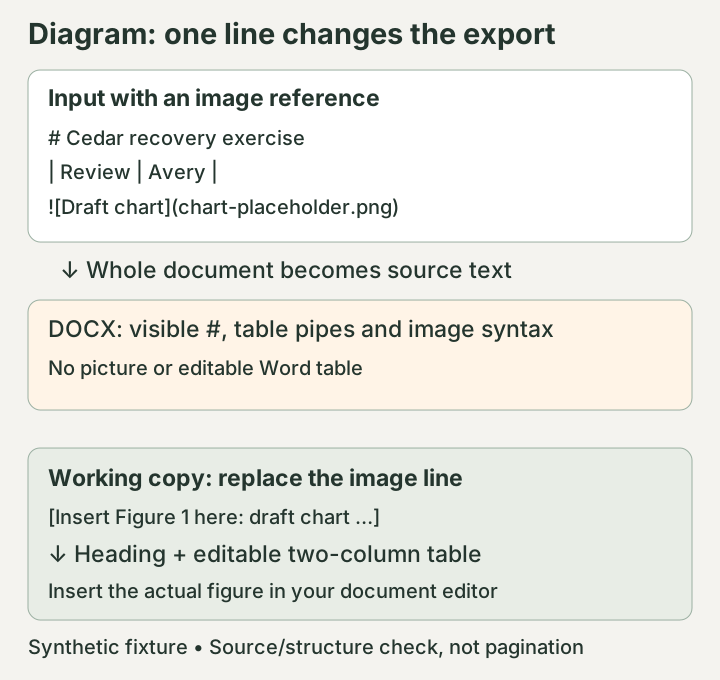
Diagram of the tested conversion paths below, not a Word screenshot. The picture still needs to be inserted separately after recovery.
Compare one changed line
Download the image-trigger input or paste this fictional example into the converter:
# Cedar recovery exercise
Budget: $19. Remaining allocation: $1,250.00.
| Item | Owner |
| --- | --- |
| Review | Avery |

The preview should show the source, and the status should warn that images are unsupported. In the resulting DOCX, the image notation and table pipes remain text. There is no embedded picture or Word table.
Now replace the last line with:
[Insert Figure 1 here: draft chart; source file chart-placeholder.png.]
The recovered input produces a DOCX with a heading and a two-column table. Avery remains in the Owner column, and both currency amounts survive. The insertion note also remains, so the missing figure is visible during review.
These files were generated and their DOCX XML checked with Node.js and docx 9.15.0 on macOS on 30 October 2026. This check establishes text and document structure; it does not establish pagination in Microsoft Word. The compatibility and test notes describe that boundary.
If the warning says math
Add Review expression: $x + y$ to the recovered input. It triggers the same whole-document fallback, with a math warning. The math input and its DOCX let you inspect that case without changing your own report.
The detector searches the source, including code fences. Image notation inside a code example can therefore trigger fallback too. Math detection uses delimiters, including $$, \( and \[, rather than a full equation parser. Backticks do not reliably protect an example from detection. Ordinary prices such as $19 and $1,250.00 pass this fixture, but check unfamiliar dollar-sign combinations in your actual text.
If there is no image or math warning, check whether you pasted the entire report inside an outer code fence. A malformed table can also remain text or stop export; see the table preflight. Raw HTML and footnotes have separate limitations and do not by themselves explain this fallback.
Finish the missing content explicitly
Keep the original .md and any image files before editing. A Markdown image reference does not contain the picture. Literal export is not a byte-for-byte backup either: it turns source lines into paragraphs and removes a final newline in this path.
Use numbered insertion notes for figures or equations you still need. Keep exact equation notation in the original source, then insert the missing content with your document editor. Compare each note with its original caption or equation before removing it. If the report depends on many equations or graphics, choose a workflow that supports them and test a representative section first.
For a batch, save the repaired .md files and select them again. Editing the on-page buffer does not rewrite selected files. The partial-batch recovery guide shows how to check which version was exported.
Conversion checks and known limits: test methods, pagination, unsupported content, and environments not yet tested.